
XRefresh
will refresh your browser during development
About
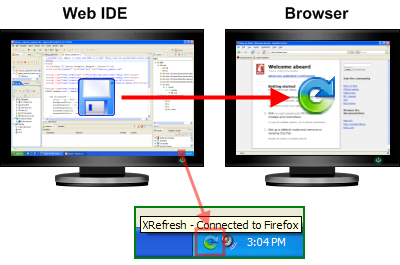
XRefresh is a browser plugin which will refresh a web page due to file changes in selected folders. This makes it possible to do live page editing using your favorite HTML/CSS editor.
The typical usage scenario is for local web development on a machine with two monitors. The first monitor is for the source code editor and the second one is fully dedicated to previewing the web page in Firefox. Thanks to XRefresh, the page in Firefox is automatically updated with saved changes in the source files (html, css, js, images). XRefresh also provides the advanced feature “Soft Refresh”, which enables you to modify CSS files on-the-fly without a full refresh. With this feature you can get a similar experience to live editing of CSS in Firebug.
Screencast
Windows
- install Firebug 1.4 or higher
- install XRefresh Addon (you don’t need this step if you are going to use XRefresh with IE only).
- download Windows Monitor and go through the installation process. It will install XRefresh traybar application and IE plugin.
Usage
Launch XRefresh and check for it in the traybar.
After starting, the icon is gray which means that there are no browsers connected to XRefresh.

Tell XRefresh where your files are located. XRefresh will watch for your modifications.
Tip: You can simply drag&drop interesting folders onto configuration dialog.
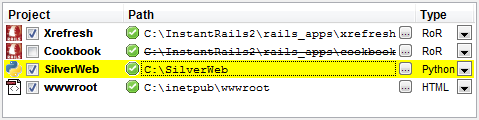
Let Firefox or Internet Explorer connect to XRefresh.
Firefox
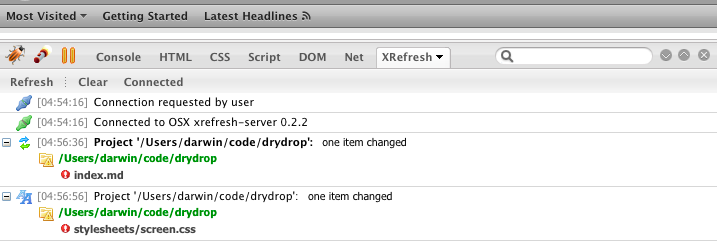
XRefresh has its own tab panel in the Firebug window. You need to enable Firebug for a particular site to enable XRefresh functionality.
Internet Explorer
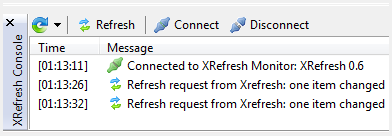
In Internet Explorer 7 you can find the XRefresh icon in the tools in the top right corner (the icon may be hidden in the chevron section).

The icon reflects the connection status. You can click it to open XRefresh Panel
Mac OS X
- install Firebug 1.4 or higher
- install XRefresh Addon
- install Ruby Cocoa (filesystem monitoring depends on native Cocoa FSEvent API)
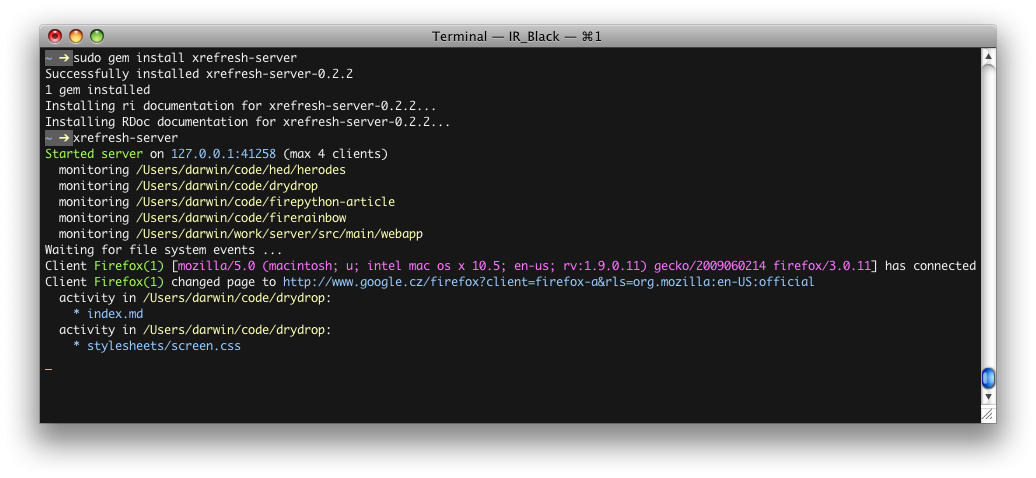
- execute
sudo gem install xrefresh-server.
Usage
After installation, the xrefresh-server executable should be added to your system path.
To start the server simply run xrefresh-server from command-line.
Having problems running it? Maybe it’s because of RubyCocoa problems, as some people had on Leopard. Check http://gist.github.com/158851.
When it is first run, a default config file will be created in ~/.xrefresh-server.yml:
You are encouraged to modify paths section to map to your working project directories.
By default the config file is searched for first in the current directory and then in your home directory.
You may also specify the path to your config file via --config parameter.
FAQ
Is XRefresh still in development?
No, XRefresh was superseded by LiveReload. I started XRefresh back in 2007 and it worked really well for me and other folks, but it has some issues. The main issue probably is ever changing Firebug and Firefox versions and time it took me to maintain the compatibility. Recently Andrey and other guys from LiveReload put a lot of effort into making a better tool for refresh-driven development. LiveReload has more features, it is maintained and also provides support for multiple browsers.
Why is dual monitor setup great for web development?
One display is fully dedicated to your browser window showing the page you are currently editing. With XRefresh you don’t need to switch between windows. Stay in your favorite text editor.
What is “Soft Refresh CSS” feature?
XRefresh is able to replace an externally linked CSS file with an updated version without reloading the whole page. I call it “soft refresh” and it is handy in dynamic AJAX-style applications. The page stays in the same state and does not blink during refresh. With this feature you can get a similar experience as Firebug on-the-fly CSS editing (without the pain of syncing changes back to original source). This is disabled by default, you need to enable it in XRefresh menu (under context menu on XRefresh tab button). Here is a minimal example page using this technique. You should be able to see soft refresh icons when modifying style.css.
What is “Soft Refresh JS”?
XRefresh is also able to replace externally linked JS file with updated version without reloading whole page. It works similar to Soft Refresh of CSS, but there is a catch. Remember, the updated script is just evaluated as-is in the context of the main window (because it is added as a new script tag). So it is not able to remove deleted functions, it will not update anonymous functions bound to elements or for example it will not call the jQuery onReady function again. If you don’t understand these consequences it is better to not enable this feature and go with full refresh. Soft Refresh JS is disabled by default, you need to enable it in XRefresh menu (under context menu on XRefresh tab button). Here is a minimal example page using this technique. You should be able to see soft refresh icons when modifying code.js.
Is there support for Safari? Opera?
No plans, I’m happy with Firefox. Support for IE will be dropped in the future. For Safari there is a similar project to XRefresh called LiveReload.
I’m editing files directly on my server via ssh, is it possible to use XRefresh over the network?
XRefresh monitor communicates with the browser extension using TCP/IP. So, it is possible, but it may be tricky because you need to disable your firewall and make sure they see each other. By default the browser extension tries to connect to 127.0.0.1 on port 41258. In Firefox type
about:configinto the URL bar and filter keys by “xrefresh”. Keysextensions.xrefresh.hostandextensions.xrefresh.localConnectionsOnlyare what you are looking for.
Do you support @import linked css files in Soft Refresh of CSS?
No, you have to link all css files directly from the root HTML using <link rel=”…“> tag. Other kinds of css stylesheets linkage are ignored during soft refresh.
I don’t see XRefresh panel in IE. What should I try?
Delete these keys using RegEdit:
HKEY_CURRENT_USER\Software\Microsoft\Windows\CurrentVersion\Explorer\Discardable\PostSetup\Component Categories\{00021493-0000-0000-C000-000000000046}HKEY_CURRENT_USER\Software\Microsoft\Windows\CurrentVersion\Explorer\Discardable\PostSetup\Component Categories\{00021494-0000-0000-C000-000000000046}
How do I get rid of POSTDATA confirmation dialog during refresh?
First, try to use soft-refresh feature to not resend data at all. Tweak only live CSS. If this is not possible consider tweaking
browser.sessionstore.postdatato 1 in about:config. You should learn about the consequences of doing so.
Changelog
- v1.5 (05.12.2010)
- compatibility with Firebug 1.6
- fixed buggy JSON encoding on Windows (updated to Json.NET 3.5 Release 8) - more info
- prevent flickering and scroll jumping during soft refresh of CSS
- v1.4 (09.11.2009)
- tested Firebug 1.5 compatibility
- fixed broken option checkers in panel context menus of Firebug (more info)
- v1.3 (09.11.2009)
- v1.2 (09.07.2009)
- Firefox: Soft Refresh works with CSS files using relative paths (Issue 4)
- Firefox: Soft Refresh reloads CSS from server, so it works with CSS preprocessors like sass or less
- v1.1 (29.06.2009)
- v1.0.2 (26.06.2009)
- Firefox: refresh correctly bypasses cache
- Firefox: document scroll position is restored after refresh
- v1.0.1 (21.06.2009)
- fixed fatal bug in 1.0 release (Windows only: communication failed when updating CSS files) - thanks Alejandro Torres for tracking this down
- v1.0 (21.06.2009)
- compatibility with Firebug 1.4 (unfortunately changes are not backward compatible for older Firebug releases)
- more robust communication protocol (should solve occasionally broken connections)
- Soft Refresh can be used over network (as a side product fixed strange Firefox bugs when reading files from local filesystem)
- fixed problem with Helvetica font on localized Spain Windows
- changed extension guid back to xrefresh@xrefresh.com to continue in original project at addons.mozilla.org
- v0.9 (never packaged)
- OSX monitor ignores events from .git directories
- XRefresh respects cached resources
- changed extension guid to xrefresh@hildebrand.cz, compatibility with Firebug 1.3
- v0.8 (19.07.2008)
- added OSX support
- fixed bug in extension networking
- extension can be enabled/disabled per site (uses new firebug 1.2 feature for this)
- v0.7 (25.02.2008)
- “Soft Refresh” feature
- v0.6 (02.01.2008)
- public release
- v0.5 (12.11.2007)
- internal alpha
Links
XRefresh was superseded by LiveReload
Articles and Reviews
- Automated browser refresh addon for Firefox and IE by Elio Rivero
- Automated Browser Refresher For Developing Easier: XRefresh by Web Resources Depot
- Browser Refresh Automation (XRefresh) by Brenley Dueck
Software used
- Great Silk icons by Mark James
- FlexControl by Michael Chapman
- Json.NET by James Newton-King
- XPTable by Mathew Hall
- MozBar by Patrik Bohman
- UnhandledExceptionDlg by Vitaly Zayko
- FirefoxDialog by Rafey
- RubyCocoa by RubyCocoa Team
Thanks guys!
